




Stable version : 4.0.11120600
Latest version : 4.0.17042100
Supported browser versions
Firefox 2.0 - 10.*

Welcome to Wired-Marker
 |
 |
|
|
"Time flies when I am conducting a research using the Web, and I cannot make any progress in summarizing the results!" Such complaints are a thing of the past. By simply highlighting parts of Web pages as you view them successively, a bookmark that has references to the information source is automatically created. You can highlight pictures and tables as well. Wired-Marker saves all the information that you need for writing your report as you conduct your research. |
||
 |
 |
What is Wired-Marker?
Wired-Marker is a permanent indelible highlighter that you use on Web pages. The highlighted content is automatically recorded in a bookmark and also able to go back quickly to where you highlighted with the “electronic book mark”. The color and the font of the marker are editable anytime.
To use Wired-Marker, you simply drag & drop the selected sections into a bookmark folder. You can highlight not only text but also pictures, tables, and selected portions of the screen. You can even add notes to the highlighted items.
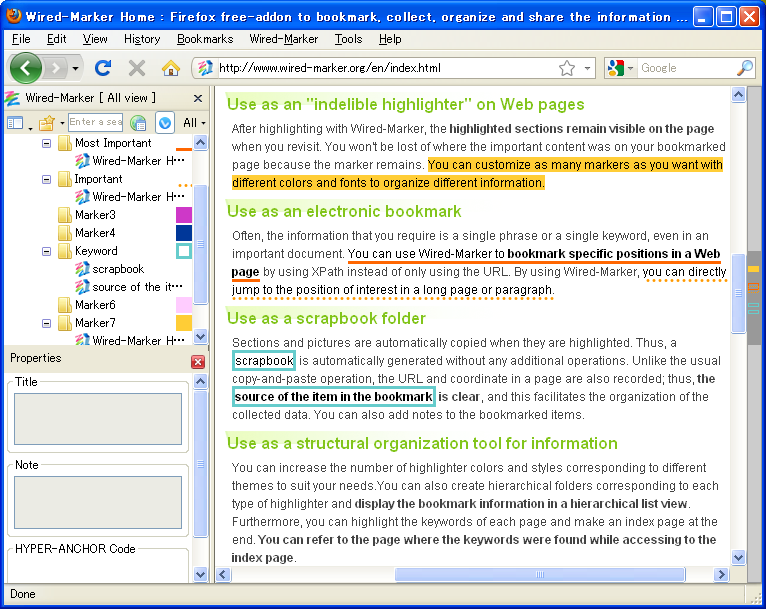
Use as an "indelible highlighter" on Web pages
After highlighting with Wired-Marker, the highlighted sections remain visible on the page when you revisit. You won't be lost of where the important content was on your bookmarked page because the marker remains. You can customize as many markers as you want with different colors and fonts to organize different information.
Use as an electronic bookmark
Often, the information that you require is a single phrase or a single keyword, even in an important document. You can use Wired-Marker to bookmark specific positions in a Web page by using XPath instead of only using the URL. By using Wired-Marker, you can directly jump to the position of interest in a long page or paragraph.
Use as a scrapbook folder
Sections and pictures are automatically copied when they are highlighted. Thus, a scrapbook is automatically generated without any additional operations. Unlike the usual copy-and-paste operation, the URL and coordinate in a page are also recorded; thus, the source of the item in the bookmark is clear, and this facilitates the organization of the collected data.
Use as a browsing tool for collected sentences
Highlighted sentences will automatically be saved. You can distinguish sentences on the web page and collect them in folders at the same time. List of highlighted sentences is available for editing, so it is easy to make an abstract of each sentence.
Other useful functions
Image capture
When using image capture, you can save selected sections from a picture stored on the clipboard or from the displayed Web page as images and organize them in the same manner with marker items.
Auto-cache
With the auto-cache function, your book mark information with highlights are automatically saved as cache, so you don't have to worry about your book marked information getting lost with the renewal of the web page.
Export
You can export and save/ share all the information contained in a folder as a file. It is very useful because addition to the book marked page, the highlighted information will be also shared.
Search function
For all highlighted sentences, you can perform full-text search and date retrieval. This helps you to effectively organize and manage the sentences.
How to use
- Install the plugin.
- The folders in the sidebar correspond to each type of highlighter.
- Display a Web page, simply select the text or pictures and drag & drop them into the highlighter folder.
Click here for more information.
Other uses of Wired-Marker
- For comparing products and prices by browsing Internet shopping sites.
- For writing scientific research papers (e.g., for organizing references and quoted sentences).
- For collecting and organizing information related to products for affiliate advertisements.
- For primary school students' summer vacation projects.
- For engaging in research field work on the Internet for various investigations.
| watch in high quality |